Hotspots

Ever since I heard about libraries in New York City and Kansas City that lend Wi-Fi hotspots, it’s been my dream to offer that to students at our small rural campus library. The September 2015 issue of American Libraries featured a two-page article about it, which reminded me about the project. You can read the article here.

However, let’s not get ahead of ourselves–I just got the funding for our tablet program, and it’s going to be quite a project. I will be working really hard with our dean, ITS at the main campus (we don’t have an actual IT person at our campus), and staff and student workers to roll it out by the beginning of the Spring 2016 term. I want to get through one term with the program in order to assess it. If it’s successful, then I feel like we can try to offer a new thing.

I know of one another college librarian on a listserv who has asked about college libraries doing this, particularly for commuter rural campuses. I got in touch with her, and she hasn’t heard from anyone yet.

I was really surprised to read that in Kansas City, MO, 70 percent of kids don’t have broadband Internet access at home (Inkleberger, 2015). The number is striking because, nationally, according to the Pew Research Center, 30 percent of households don’t have broadband access (Zickuhr, 2013). I was already planning a study of Internet access and technology devices for our small campus, and it seems even crucial that I get started because while I know a lot of our students don’t have reliable access at home, I’m not sure of the actual number. That figure is going to shape a lot of my plans and also give me the information I need to make a case for funding. I will definitely be getting in contact with our Office of Grants and Institutional Research. I happen to be a member of my college’s Institutional Review Board, so it helps that I have actually reviewed proposals.

Honestly, I have a really cool job. It’s a challenging one, but a really cool one. I feel like I am making good efforts to solve problems and help students on their educational journey.

LexisNexis Academic Webinars

This year, I am making good on my goal to actually watch webinars when they happen and/or watching the archived recording during the same week (or at least month!) I receive access to it. I have a few saved from last fall and spring semesters that I need to watch.

I participated in LexisNexis webinars at the end of August, and while I do use LexisNexis at the community college and at the university, I don’t use it a whole lot. Here are my notes for each of the webinars.

LexisNexis Academic News

  • LexisNexis Academic News has 17,000 sources.
  • LN also has broadcast transcripts and transcripts from news shows, like 60 Minutes.
  • LN also has speeches, both the transcripts as prepared, as well as transcripts as delivered (the online trainer said that President Bill Clinton was famous for straying from the prepared speech).
  • LN also has a feature that opens web news from 300 web sources.
  • Coverage varies by the source and updates also vary by source. For example, full-text NYT articles date back to 1980 and content is updated daily). The lesson here is to use the information button next to the source name for the details.
  • A note about full-text: While the articles available in the database are full-text, not all articles from a particular source may be included in the database. I knew this, but I didn’t exactly know why. One reason is that freelance articles are owned by the journalist, not the publication, so journalists can elect to have their content removed from the databases.
  • LN will find the singular, plural, and possessive forms of words in searches.
  • LN will also find equivalents, not to be confused with synonyms. For example, if you type 1st Amendment, LN will also find First Amendment. This is a really good tip when it comes to numbers in this context. A search for GOP will also bring up all versions of Republican Party.
  • Librarians love field searching. I hadn’t fully explored all the search possibilities, so searching by length was new for me. What I love about this is that it might be helpful for lower level English courses. (This kind of searching reminds me of Dialog, and I was obsessed with it. I was in library school between 2010 and 2011, and even we used Dialog. Headline searching FTW

LexisNexis Legal Research

  • I don’t think I have learned this much from one webinar before. I don’t get too many legal reference questions, but I can tell you that it’s not my strong suit. I always used LN with some trepidation, and while the students and I could find the relevant cases, I knew that I needed to know more about the legal research side in LN to get the most out of it.
  • For legal cases, you can search by citation, party, or topic.
    • Citation: You have to use the exact Blue Book citation, including the periods. The citations are composed of three parts: the first number refers to volume, the second set of letters is an abbreviation for the book or reporter, and the third number refers to the page.
    • Party: You don’t have to enter both party names, and they don’t have to be in the right order. LN will do the search. Just be aware that when doing a party name search, LN will go through short party names, as well as the full list of parties involved, which could be numerous. For example, a search for Jones v. Clinton will also pull results for completely different cases whose short party name does not have either Jones or Clinton. I used to wonder why results like this pop up, but the online trainer said that when LN does the search, it pulls matches from the full list of parties, not just the short party name. Party search looks for matches in the full list.
    • Topic: This isn’t natural searching. This search will look in the headnotes section for matches. Think of headnotes like subject searching/breadcrumbs in the legal world. Here’s how headnotes are super nifty. They tell you all the subjects/topics covered by a particular case. For example, if you look up the headnotes for Roe v. Wade, you can find that other issues besides a woman’s right to choose were involved.
  • The reason why a million things pop up when you do a party search for Supreme Court cases—everything related to a Supreme Court case gets published. This is why you get a lot of hits looking up one case.
  • LN has a handy Landmark Cases feature, which you can find near the big “search everything related to LN” search box. There is a button to the right of the large search box that says “Search by Content Type,” where you can find the Landmark Cases feature. Cases are organized by topic. This is such a useful tool for the kinds of material two-year college students need for their coursework.
  • Also under the legal section under the “Search by Content Type” button is a way to search for federal and state cases. For most student research, the online trainer says it’s best to stick to one’s jurisdiction when searching. In the Federal and State Cases Search, head to the advanced search settings. There is an option to select the specific circuit, such as the 9th Circuit Court of Appeals, as well as state, such as California.
  • One of my favorite parts of the webinar was a question the online trainer posed, emulating a reference question that is probably common, “What are all the [insert your topic] laws in California?” The easiest way is to go to the ““Search by Content Type” button,” go to the Legal heading, and then select “State Statutes and Regulations.” Under the advanced options, check box statutory code and then the state. Yay for codified law!
  • LN does not have cases related to those at the state trial level. This is because the verdict only affects the parties involved in the case. The decision does not do anything to an entire state or the nation. For these kind of cases, especially for a local issue of interest, newspaper articles are the best bet for research.
  • LN has a legal reference section! Find the “Search by Content Type” button, go to the Legal heading, and then select “Legal Reference.” Under the advanced options, you’ll find American Jurisprudence 2d, Ballentine’s Law Dictionary, Bieber’s Dictionary of Legal Abbreviations, and the Modern Dictionary for the Legal Profession.
  • At this point in the webinar, I had to talk to a faculty member, so I missed the introduction to Sheppard’s. It’s a nifty citation tool that allows you see if a case has been overturned, reaffirmed, questioned, or cited by other cases.

Exciting News!

I have some really exciting news!

I just found out that my request for 36 Microsoft Surface Pro 3 tablets for my small library was funded, at 33 percent of the request, through Merced College’s student equity funds! $16,000! The dean of my campus, the Los Banos Campus, says the rest of the amount will be funded with other monies.

Why Microsoft Surface Pro 3? They are the district-approved tablets. Why 36? There is a really cool charging cart that fits 36 tablets.

The library at my campus doesn’t have a library instruction room like the other campus, and I often have to fit sessions around the computer labs that are scheduled for other classes. Often, I go to classrooms without any computers, so students don’t get to play with databases during library research sessions.

When the tablets aren’t in use for classes, students will be able to check them out to use in the library. We only have 17 computers available in the library for 1,800 students, and our statistics were around 18,000 computer uses for 2014-2015. This does not include statistics for the open computer lab across the hall.

The Student Equity committee for the college created a document of goals for both campuses, so part of the application for funding had to show how the proposed project helped meet those goals. I also incorporated how the project met the college’s strategic plan and institutional learning outcomes and how it fit with the goals of the Learning Resource Center’s program review and student learning outcomes. I think my request was also funded, in part, because it serves an instructional purpose. I included a lot of evidence in the document, and my dean was impressed with what I put together.

I have been on pins and needles waiting for a response from the committee. I am so pleased! If we go off of the timeline I created for the project, we will begin our tablet service in Spring 2016.

The start of my third full-time academic year has been fantastic! My three-year review process also begins this coming Tuesday, so I am feeling pretty good.

Participatory Culture & Vernacular Collections at the Library

I have a bad habit of collecting links through the save feature on Facebook. However, I seem to notice a penchant for public art. Consider this Colossal post about an artist who bought billboard and this NPR article about kids’ art taking over billboards in Times Square. I love members of communities being able to take part in their communities. Participatory culture is something I have been trying to cultivate in the community college library.

In Fall 2013, I did half of the Hyperlinked Library MOOC through San José State University, my MLIS alma mater. It allowed me to explore a little more about user experience, and it really got my excited about the possibilities for participatory culture in libraries. In one class discussion, I shared about the display space kids in the community are able to use to display collections of all kinds in the children’s department of the Stanislaus County Library (I worked as a bilingual Spanish/English library assistant in the children’s department for a couple of years). Kids ages 4 and up can sign up for either a display table or display case to show off rocks, soap, dolls, books, trains, cars, PEZ dispensers, LEGO creations, etc. The collections were very unique and customers of all ages love looking at new arrrivals. The collections stay in a locked case or table for two weeks. It truly is one of the coolest things that allow kids in our community to really feel that the library is theirs. (As it turns out, the idea of displaying everyday items is a thing. I did a little research, and these are called vernacular museums. I have to do a little more reading about them, but I did contact a professor from Pine Manor College about her work last year.)

I also think this idea would work well in even an academic library if locked displays cases are available. The University Library at my undergraduate alma mater, California State University Stanislaus, sort of has this with their Warrior Book Contest, which is essentially a topical bibliography students can submit. Winners can have some of their books put on display, and it’s always really interesting to see the winners’ lists and displays. I have a friend from college who won one year. I have tried a similar tactic to have individual students sign up to do book and online resource displays at the community college library, but it hasn’t worked out so far. We only have one student club on campus, so I am going to check with them this semester. But the idea of displaying collections doesn’t have to just be books and online resources. It could be action figures or Hello Kitty memorabilia. College can be fun.

Smore

I am obsessed with Smore. Smore is a fast way to make flyers and newsletters online. Last year, I started using Smore for our new book lists. (In the pre-Lindsay years, the library media technician and clerks sent out a typed list of titles in email–attached as a Word document. In my first year, I started sending out monthly email updates that included the hyperlinked titles of new books.) Recently, someone asked about newsletters on a library listserv, and I was able to share a book list as an example. I got some nice feedback on the one I shared there, which inspired me to do a library newsletter beyond book titles.

I didn’t do one before because every Tuesday, the faculty lead at our small campus sends out a newsletters called Tuesday Tidbits (it used to be the Monday Memo) in which different faculty members submit committee updates and other news. This first month, I had so much to update, I decided to do one giant newsletter rather than submit to Tuesday Tidbits. Now that I sent an initial newsletter, I probably will do the Tidbits route more often than our own newsletter.

In my last post about displays, I also talked about the new series I am doing called Major Idea. I post our displays to Facebook (Instagram is my next frontier) and in the faculty emails I send out,  but I also decided to put the materials I put on display in a hyperlinked list via Smore, sort of like a pathfinder. My giant library newsletter also links to the display materials lists for the Major Idea displays for psychology and art history and our Women’s Equality Day and water and drought displays.

I was pretty thrilled by the feedback I got from our newsletter. What I love about Smore is that it allows you to see how many views you get, too. Smore only allows you to make five flyers so free, but the educator account is just $60 a year. It is so worth it!

Psychology

August 2015 Library Displays

This isn’t anything mind blowing as far as libraries go, but I really believe in the power of displays in showcasing not only resources but also getting library users to discover a new topic or idea they might not think up on their own.

My library is two thousand square feet, and our campus serves about 1800 students. We don’t have a lot of space for displays, but I use all the nooks and crannies and sometimes a book cart parked by the research help desk. I mostly use the lower reference shelving underneath a giant window, which, unfortunately, is in the back of the library, but it’s closest to the main bank of study tables.

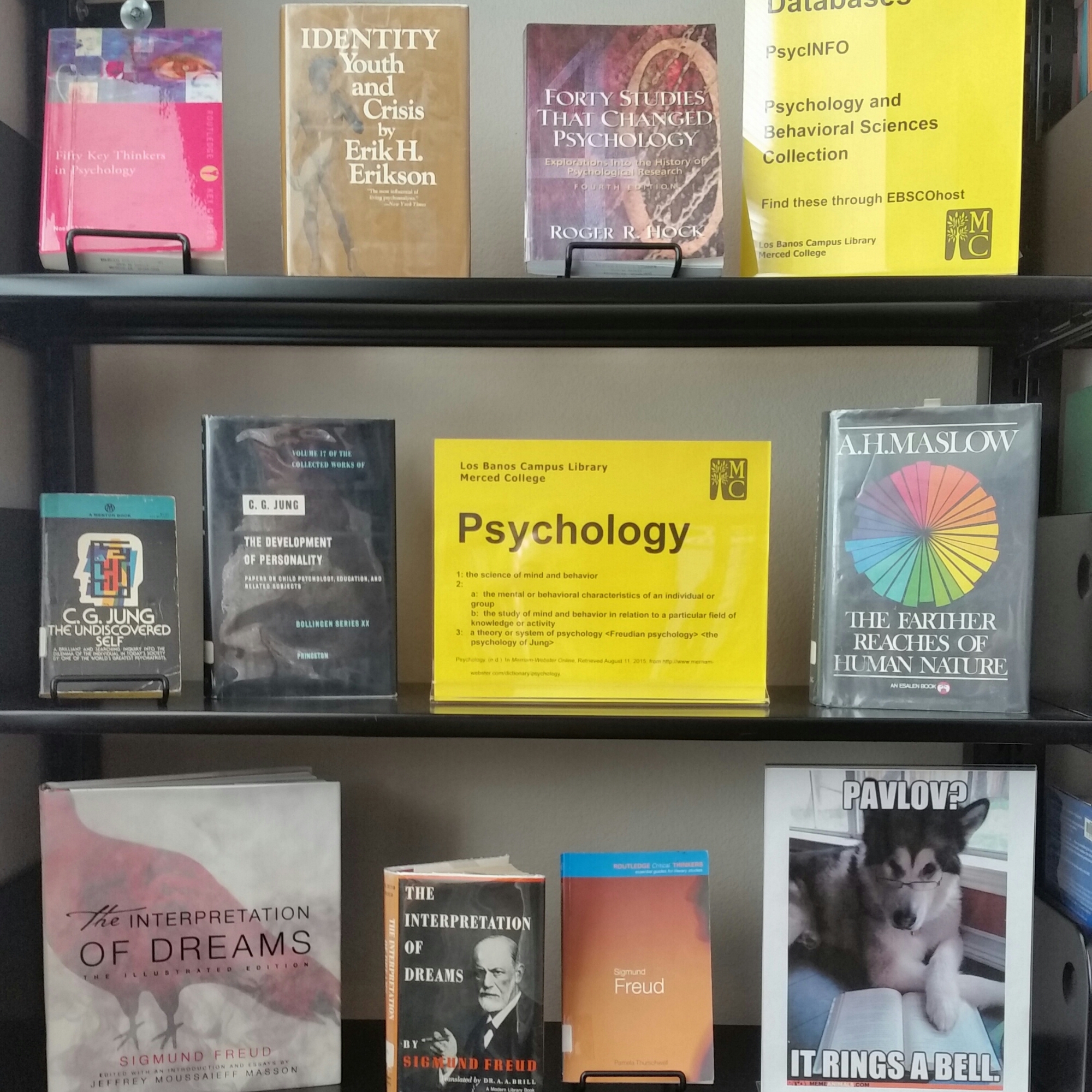
There is a section within the higher reference shelving I’ve carved out with shifting and weeding. It’s the space I have dubbed Major Idea in which I’ll be displaying books and databases related to a topic or idea within a major offered by the college. First up is psychology.

It’s not pictured, but I also am advertising the services offered by the academic counselors and our new career counselor for those interested in the psychology major and/or careers in psychology. I also have a college catalog on display. (When I went to check on the display the next day, the illustrated Interpretation of Dreams had been checked out! )

Psychology

August 18th was the 95th anniversary of the 19th Amendment of the U.S. Constitution. August 26th is Women’s Equality Day, which celebrates the 19th Amendment’s ratification.

Women's Equality Day

Since I snapped this photo, I’ve shuffled things around and also added resources about the Voting Rights Act of 1965. The Act banned racial discrimination in elections, which enfranchised more women and men of color, especially in the South. It’s an incomplete story without this bit of history.

Here is the online flyer for Women’s Equality Day and the Voting Rights Act of 1965.

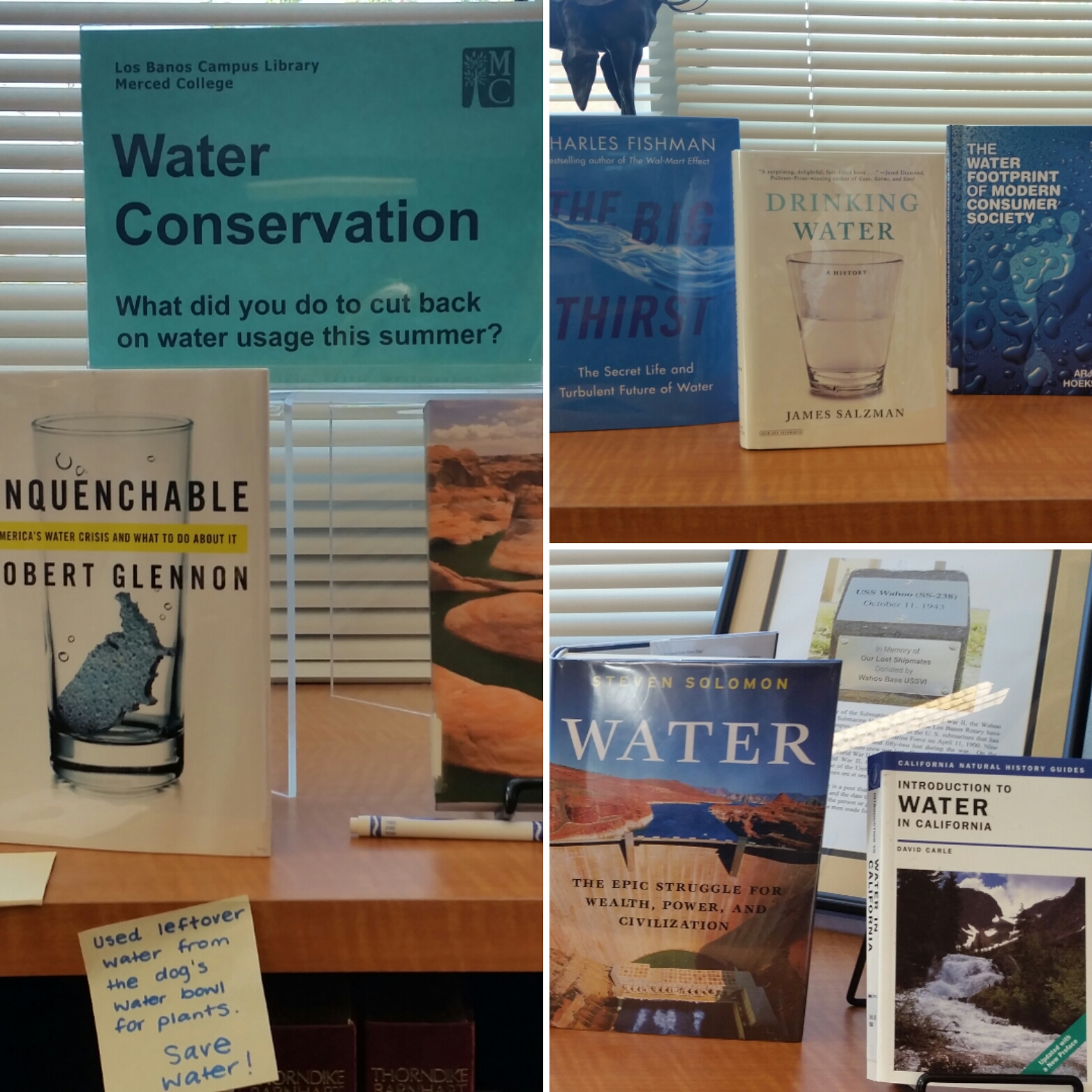
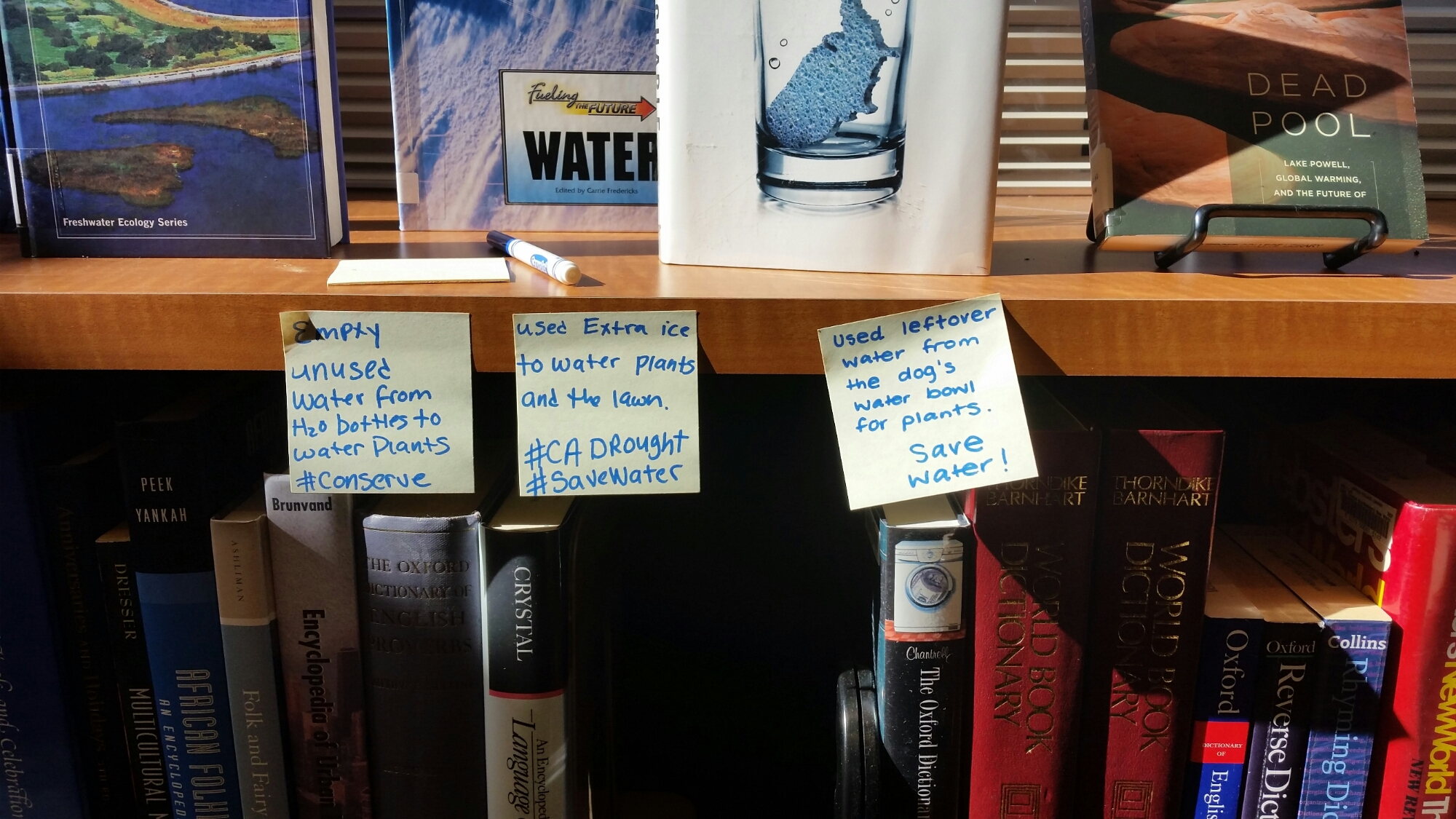
Since we’re in California’s Central Valley, drought has been ever-present the last few years. Both college campuses have brown lawns, and we’re proud! I put up a display about water and drought materials, a quick list of relevant websites and databases, and I incorporated some interactivity by asking how students cut back on water usage this summer. Since it’s in an awkward spot, I didn’t expect more answers beyond my own example on a Post-It, but I was pleasantly surprised.

Water Conservation Drought Websites Drought Ideas

This year, I’m going to see if I can get our student workers and staff to participate in some displays. Now that I have evening colleagues, I asked one of them if she’d like to do the Banned Books display this September. It’s always a fun one to do, but September is just really busy with many other events, displays, and information

Library Services Flyer Aimed at Faculty

I go back to the community college library tomorrow. I’m looking forward to the new year. I have some fun ideas to work on, and I am feeling more confident about my abilities. It also helps to let go of those things you cannot control or all the things you wish you could do but can’t for any number of reasons, etc.

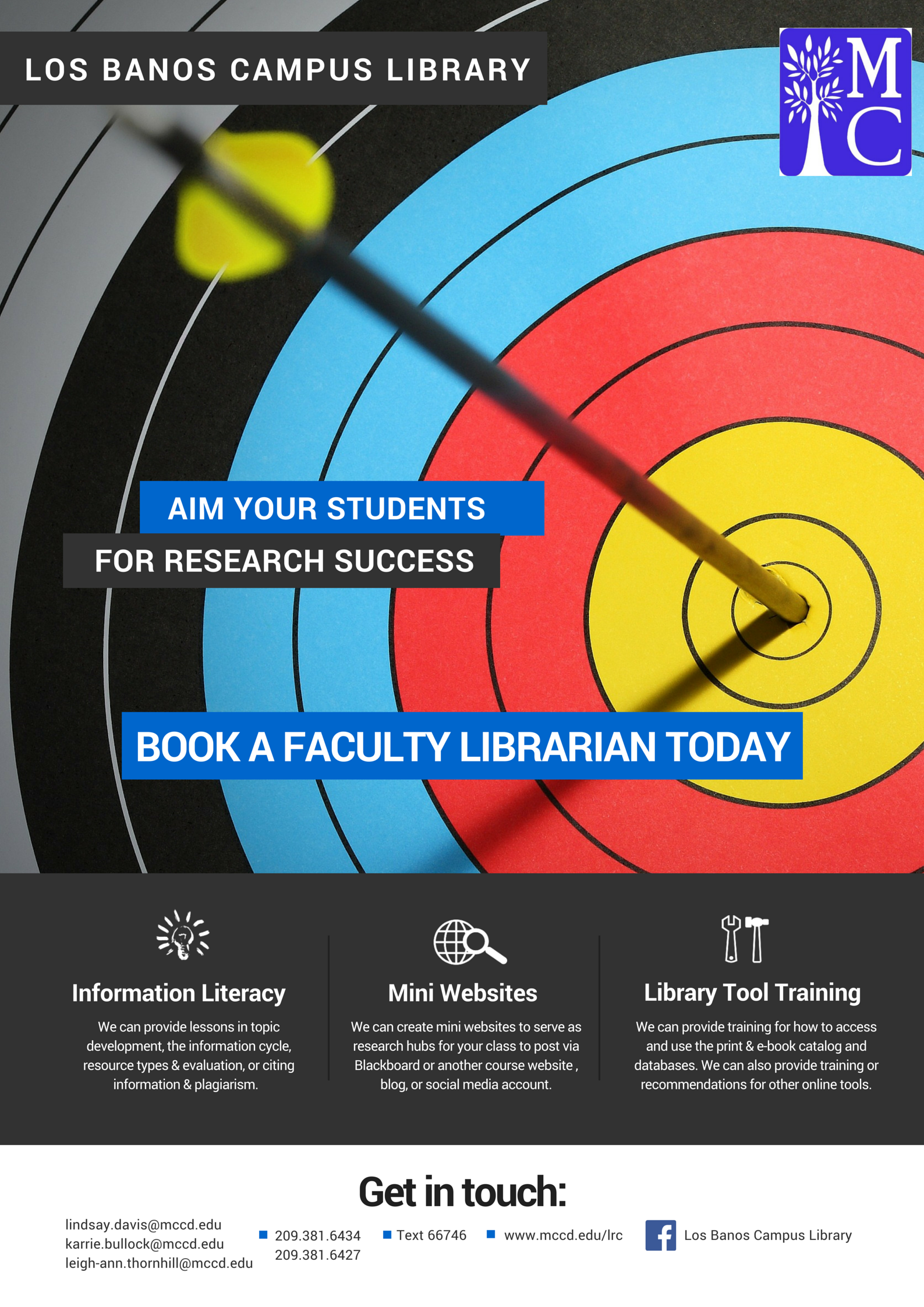
I meant to have a flyer for library services aimed at faculty ready to go by Monday, but I won’t be ordering the flyers through the college’s Print Services department until tomorrow. Since I work at the smaller of the college district’s campuses, our mail gets delivered through a courier once a day. I should get them by the end of the week. Here’s what I did through Canva, which is one of my absolute favorite tools I use at work.

Aim Your Students for Research Success

I also plan to update our flyer for students (it’s actually half-page size). For the last two years, I have only ordered it in black and white on light yellow card stock as it cuts back on costs, but it doesn’t match my style or the culture I’ve worked so hard to mold the last two years. I’m hoping to create something similar to the one I made for faculty this year. I’ll work on it this week while waiting for the faculty flyer.

Scrabble Banner

Library GamesI absolutely love this Scrabble banner tutorial: http://sarahhearts.com/wp-content/uploads/2013/07/scrabble-banner.pdf 

I used it for our inaugural library game night in October 2014, and I have also used it for our campus’ Fall Festival, and our library game night this past spring 2015. I just keep it in a manila folder, so it doesn’t get tangled.

A few words on the tutorial. Our color printer at work is extremely old and not very powerful, so what I did was print it out in black and white on regular computer paper, and then I ran the letters I needed through the copy machine onto kraft cardstock I got at the local Wal-Mart, which is the closest store to campus. I had twine at home. The only other supplies you need are scissors or a paper cutter and a single hole punch.

It came out super cute. What do you think? I am going to make a “welcome” banner for the library window facing out to the hallway (we’re a room in the Student Services building, so the hall is hot real estate) for the first week back to school.

Reuse, Recycle, Share

I usually just browse American Libraries magazine. A lot of what’s in there isn’t always relevant for me, but sometimes there are things of note. In the January/February issue, Meredith Farkas wrote a piece called “Reuse, Recycle, Share.” She writes, “We spend a lot of energy trying to create things from scratch when, frequently, another library may have already done something very similar.” As the only full-time faculty librarian on duty at my campus during the daytime, I definitely don’t have the time to come up with fantastic new ideas or create refined tools, so I am always looking for things like instructional videos or handouts college libraries have made and licensed through Creative Commons. (It took me a long time to realize that borrowing ideas didn’t mean I wasn’t creative; see Brain Pickings’ post, “Austin Kleon on 10 Things Every Creative Person Should Remember But We Often Forget.”) One of my favorite librarian groups that is generous with their ideas and templates is ACRL’s Library Marketing and Outreach interest group.

Earlier this summer, outreach librarian Stacy Taylor posted a great display she did with emojis. It is the perfect addition to my new display idea, Major Idea. Last semester, I weeded four shelves worth of reference items that were outdated, so it created a little, slightly awkward opening for display space. I needed it to more purposeful, so I came up with an idea that will highlight a topic/subject that relates to a major/degree the college offers (how about Renaissance art featuring this image, some books, print outs of some e-book covers, a database recommendation, and maybe some info on art history majors nearby…?) I will have to test it out, but I had planned to kick off with psychology, so how perfect would emoji books be as a fun addition? The old, naive me would have re-created this idea from scratch, but the starting-on-my-third year me asked if she had some kind of ready-made document, and Stacy kindly sent me her titles and emojis via Google Docs, and I downloaded that puppy. I am so grateful for the time Stacy’s document will be saving me!

My thought is that we will be switching out the Major Idea area every two weeks, but I will be asking for help from the student workers, staff, and the two part-time evening librarians to take a turn, so that we all get to be creative, contribute, and learn more about our resources while researching ideas, books, and databases. I also wrote some preliminary guidelines, which include promoting an e-book or two and subject databases, as well as an explanation about the purpose, and that asking for help is perfectly okay. I realize not everyone is as comfortable with displays as I am, but I definitely need more help to get things rolling now. I will be kicking off as an example, which is sort of not the best since I want people to feel free in their creativity, but I am the only one who will be around before school starts to get that part of the Library ready.

As I write, I’m looking at my monthly display calendar, and it’s a little overwhelming, but with help from fellow library staff and librarian friends sharing fantastic ideas, we can make it happen together.

Coloring Party and Other Ideas for Finals

During finals this year, I had coloring pages available. I only printed a few out the first day (some design I could download for free online), and the next day, one of the student assistants said I needed to print out way more because “people really like them.”

I have noticed an upswing in talk about the relaxing powers of coloring lately. Even NPR and Quartz have chimed in, and I think I remember seeing something on Huffington Post. It’s rare that I go to the local Barnes and Noble (I am a library user, after all), but I went a couple of days ago and was so surprised by all of the coloring books on display.

Long live coloring! I will still be offering coloring pages during finals, but I think in addition to my once a term game day/night, we need to have a craft and coloring party, too. I will definitely be talking to our student workers about it in August.

While I can’t remember where I downloaded the mandala image I used during this past academic year, there is a Facebook page, Coloring Pages for Adults, that offers free, downloadable pages to color. With back to school sales around the corner, now is also a good time to buy colored pencils and sharpeners. We have electric sharpeners in the library, but for a bigger event, we’d be in the Student Lounge, so we’d need little sharpeners. Right now, I can tell you for a fact that Target has a 12-pack of Crayola colored pencils for 97 cents.

I know there are some academic libraries with the big bucks and staff for massages, pet therapy, and coffee and cookies, etc., but even the smallest of libraries like mine can do something to help students de-stress during exam season. Puzzles and games are a great idea if you have the space. Our game night, for example, doesn’t happen in the Library because we are only two thousand square feet. Another option for small libraries might be to provide a crossword puzzle or word search. Origami supplies are not that expensive and don’t require a lot of room. We had Origami Yoda for Star Wars Day in May. I just put up paper and instructions by the checkout desk. I also do Starbursts “for a burst of energy” and mini Crunch Bars for “crunch time” near the doors. I do purchase those on my own because I only have a couple of hundred dollars I can use for the library from the college, and candy adds up so quickly.

Be creative, and, as I’ve learned, don’t get down because you can’t bring puppies or kitties to campus.