Graduate School Part 2?

So I am thinking even more seriously about applying to graduate school for a second Master’s degree. I got my MLIS in December 2011, and for the last couple of years, I have been looking at various instructional design and learning design technology Master’s programs. The impetus was when I took SJSU’s MOOC, the Hyperlinked Library in Fall 2013, though I was only able to do half of the modules, and User Experience through SJSU’s iSchool Open Classes in Summer 2014. I also took Introduction to Teaching Online through @One in Fall 2015.

The MLIS and M.S. in ID go really well together (see Bell’s “MLD: Masters in Library Design, Not Science” and Bertot, Sarin, and Percell’s “Re-Envisioning the MLS: Findings, Issues, and Considerations“). If anything, I am really interested in a certificate option, but then my brain says, well, you could have a whole second graduate degree with just five or so more classes. I have researched and talked to various people about this, and I’m a little bummed I waited so long, but I think I am ready to dive and apply! I have a little more motivation with some upcoming changes in my work life.

To jump start my desire to get into ID, I am taking a MOOC, Instructional Design Service Course: Gain Experience for Good, which starts in February.  This one appeals to me because it’s free, the time commitment is only 2-3 hours a week (way less than the class I did this past fall), and it also deals with OER and adult learners. Many points here!

RUSA, the Reference and User Services Association, is offering Introduction to Instructional Design for Librarians from Mon., Feb. 8th to Sun., March 20th. It costs $175 for ALA members, which I am. If you’re a RUSA member, it’s $130. If you’re a student, it’s $100. It’s a great deal, but there are live chats every Monday at 5 pm.

Sadly, I missed Digital Pedagogy’s the MOOC MOOC: Instructional Design announcement. It started on Mon., Jan. 25th and it ends on Fri., Feb. 12th. However, it looks like you could probably jump in. All the readings are listed!

Library Juice also offers ID, UX, and information literacy related courses. My only reasoning for not wanting to fork over $175-$250 for each of these is that I would rather spend money and time on credit-bearing courses from a university because I am interested in a second Master’s degree. I have no qualms related to MOOCs or paid independent classes or workshops for professional development; it’s just that my needs and interests are different.  The following are some classes scheduled to begin in February, March, and April.

Concepts of User-Centered Design This class started on Mon., Feb 1st, but you can register through the first week.

Online Instructional Design and Delivery

Introduction to Accessibility and Universal Design in Libraries

I also got a list of suggested readings from a listserv.

Michael Allen has several excellent titles regarding instructional design.

Articulate’s Rapid eLearning Blog

Booth, C. (2011). Reflective teaching, effective learning: Instructional literacy for library educators. Chicago, IL: American Library Association.

Brown, A., & Green, T. D.  (2016). The essentials of instructional design: Connecting fundamental principles with process and practice (3rd ed.). Boston, MA: Prentice Hall.

Clark, R. C., & Mayer, R. E. (2011). E-learning and the science of instruction: Proven guidelines for consumers and designers of multimedia learning (3rd ed.). San Francisco, CA: Pfeiffer.Note from someone: Clark & Mayer book E-Learning and the Science of Instruction, though having a few fundamental flaws, is still pretty good. I’d say about 60-75% of the information is quite good. So worth reading. There is now a 4th ed.

Dick, W., Carey, L., & Carey, J. O. (2015). The systematic design of instruction (8th ed.). Boston, MA: Pearson.

Dirksen, J. (2012). Design for how people learn. Berkeley, CA: New Riders.

Heinich, R. (Ed.). (1996). Instructional media and technologies for learning. Englewood Cliffs, NJ: Merrill.

Larson, M. B., & Lockee, B. B. (2014). Streamlined ID: A practical guide to instructional design. New York, NY: Routledge, Taylor, and Francis.

Mayer, R. E. (2012). Multimedia learning (2nd ed.). Cambridge: Cambridge University Press. Note from someone: a little problematic regarding best practices.

Morrison, G.R., Ross, S.M., Kalman, H.K., & Kemp, J.E. (2013). Designing effective instruction (7th ed.). Hoboken: John Wiley & Sons.

Piskurich, G. M. (2015). Rapid instructional design: Learning ID fast and right. Hoboken, N.J.: John Wiley & Sons, 2015.

Trends and Issues in Instructional Design and Technology

Smith, P. L., & Ragan, T. J. (2005). Instructional design. Hoboken, NJ: J. Wiley & Sons.

Wiggins, G. P., & McTighe, J. (2005). Understanding by design (2nd ed.). Alexandria, VA: Association for Supervision and Curriculum Development.

This is obviously not a thorough list. Please share resources.

If you’ve taken the plunge into instructional design in your job or are working on/already have a second Master’s degree in ID post-MLIS, do let me know.  I’d love to hear about your work and experiences.

Food Pantries in Community College Libraries

I have been under the weather since before the New Year (a cold, then a sinus infection, and now bronchitis), so I have been a little neglectful lately, but I think tonight’s post will make up for it. I’m excited, anyway.

The campus I work for is right outside the small city’s limits, serving the western side of Merced County, a county known for low levels of education, which is typical of the Central Valley in general. The campus had a headcount of 1,800 students this past fall at census. One quarter of our students are part-time students. Many are parents. We don’t have food service, and we have a very small library, small tutoring center, and small student lounge. We have 19 full-time faculty: 5 English instructors, 4 math instructors, 3 science instructors, 3 counselors, 1 psychology/sociology instructor, 1 history/political science instructor, 1 communications instructor, and 1 librarian (me).

The beauty of working at the smaller campus of a community college is that small teams can often get quicker results and be a little more innovative due to a lack of resources. Because we are so small, we work together quite often and are always thinking of ways to meet our students needs, needs that are not always academic in nature but that certainly affect their ability to stay in school. This past fall, some of the women faculty members got together at an area restaurant before a faculty meeting as a way to begin to get to know our new biology instructor. At the lunch, the chemistry instructor brought up the idea of creating a small food pantry for students in need but wanted ideas for how to make it private and where it should be located. I saw my opportunity.

Our small library has a back workroom. We keep some old periodicals and supplies in there, and it is also our break area with a fridge and table. We also keep off-season textbook reserves in there. When our part-time library media technician retired this past May, I was finally able to throw things out and work with our new full-time technician, formerly our part-time clerk, to get organized and clear the mess. It’s still wasn’t perfect at the time I made this suggestion, but I immediately mentioned to our chemistry professor that we were making room. They could use a small part of our workroom shelving to house a food pantry. Of the two buildings on campus, we are the area that is opened the longest (the front office closes at 4:30 pm on Monday-Friday, and we stay open until 8 pm Monday-Thursday and until 3 on Friday, though our technician doesn’t really leave until 4 pm on Friday), and no unauthorized people can get to the workroom. The idea is that students in need, with their student I.D., can go to any staff or faculty member or administrator, and be walked to the library workroom to get food.

We got permission from our campus dean, and while we haven’t worked out all the logistics quite yet, we decided not to advertise that it is in the library because we want it to be a little more discreet. I didn’t make the graphic for the posters we’re putting up around campus, but they are absolutely fine and will get the job done. I’ll be displaying the information inside and outside the library, and the counselors are also on board.

Interestingly, over the winter break, both The Atlantic and Inside Higher Ed shared posts about student hunger on community college campuses. It rings so true with our student population.

I am proud to introduce the beginning of our campus’ food pantry. Our chemistry instructor stocked us up with some non-perishables during the first week of the spring semester. 12615148_10156408358120573_604629448180132362_o

Small campuses with small libraries with caring faculty can make a world of difference. I am a regular financial giver to area food pantries, and I can’t believe this idea never occurred to me before. I am so thankful for our faculty and the enormous amount of nontraditional collaboration I have been able to do here.

Does your community college, college, or university have a food pantry? How are your faculty involved? How is your library or library faculty and/or library staff involved? Let me know!

UC Merced, which is the closest university to the larger community college campus, has one, and I believe I read somewhere that our community college students who live in Merced can also access it. I would love to do a little research on this topic in our area.

Copyright and Fair Use & OA and OER

The one thing I did not do in library graduate school was to spend a lot of dedicated time on copyright and other related issues. I’m definitely feeling the crunch, particularly in light of the open access (OA) and open educational resources (OER) movements in higher education. Over the summer, I was very impressed with the University of  Maryland University College‘s move to open digital resources for undergraduate education. Here is Barbara Fister’s overview of recent developments in OA during Open Access Week this past fall. Adding to the recent developments in OA that Fister lists, just today I read that the Oberlin Group, with the backing of liberal arts colleges, launched Lever Press.

In the CJCLS listserv this fall, someone posted the following report, “Opening Public Institutions: OER in North Dakota and the Nation, 2015,” and asked where all the community college librarians were in helping to lead OA/OER on their campuses. Here are some resources some people shared from that listserv, as well as some resources from a question about open textbooks from the ILI listserv:

Affordable Learning Georgia

College Open Textbooks

Lansing Community College’s OER Summit

Lansing Community College’s OER LibGuide

Northwestern Michigan College OER LibGuide 

Open Textbook Library

University of Maryland University College OER LibGuide

OA and OER are subjects I follow, but not to the degree I would like. One of the challenges is that our community college is not part of the Community College Consortium for Open Educational Resources, but according to the website “[i]ndividuals, whether they represent Consortium members or not, are welcome to use and modify materials and resources found on this website, and to participate in webinars and other Consortium activities.” I just got added to the CCCOER Advisory Google Group, so I hope to gain more knowledge. They also have a YouTube channel. I suspect that with the push for distance education in our college district, and some of the buzz that was generated by a student leader about open textbooks to the Academic Senate, we will become more involved. As the newer librarian two years away from tenure, it’s difficult to broach these subjects, but I am preparing. In fact, I took an online “how to teach an online” class this past fall with other faculty members more to see what the faculty were saying regarding content for courses, etc. There is a need for OER there.

Someone also pointed me to SPARC, the Scholarly Publishing and Academic Resources Coalition.

Here are some relevant conferences. The 12th Annual Open Education Conference was in Vancouver this past November, so I plan to take a gander at the website for #OpenEd2015. I was really bummed that San Jose State University’s one-day Open Access Conference 2015 was during a planned mini vacation. I will be on the lookout for this year’s conference dates.

I definitely also need to carve out time to watch the Blended Librarian recorded webcast On Becoming Open Education Leaders. Librarians really are in the fantastic position to lead the movement, and there are some college’s that have specific OER/OA librarians. How neat!

(As I was finishing up this post, someone posted about Project CORA, Community of Online Research Assignments: An Open Access Resource for Faculty and Librarians. I am so excited! This “library” will really enhance my information literacy instruction work!)

Another thing I have been meaning to do over the winter break is to start the the Coursera course Copyright for Educators and Librarians (librarians are educators, but okay). I still have time to begin  before I go back to work, though.

I sense a theme among some of the links I’ve been collecting over the last few months, as well.

Code of Best Practices in Fair Use for the Visual Arts

Code of Best Practices in Fair Use for Online Video 

Digital Media Law Project’s Fair Use webpage

The Berkman Center for Internet & Society and Electronic Information for Libraries (EIFL)‘s Copyright for Librarians

I also find BYU’s Copyright 101 modules to be helpful. The videos don’t really look modern, but they now have captions!

Napa: Eats, Antiques, & Library Tourism

In October, my husband and I went on a romantic getaway to Napa. Neither of us had ever been to Napa, and we only live two hours away. I don’t know why we hadn’t done it before. While there, we saw traces of the damage the earthquake had done in August 2014, but we saw a community that was vibrant and confident.

Our hotel had a homemade chocolate chip cookie hour at 6 pm. Yum!

I really enjoyed the plant life. I don’t have a super green thumb, but I do appreciate nature and am okay with low-maintenance plants.

We ate at Celadon and at The Pear Southern Bistro, checked out the Riverfront, watched an Americana show, and got our antiquing fix at Antiques on Second where we picked up a theater-style bench for our front door area, a corduroy blazer for me, and a couple of vintage necklaces. We also made a quick stop to the Oxbow Public Market. I picked up some cranberry and white polka-dot (I am really into polka-dots) Keds at a chain department store when my feet were giving out from the flats and boots I brought with me.

We also went to Napa Bookmine.

I also, unexpectedly, came across a September 11th Memorial. I noticed a structure of some kind outside a store, and I didn’t realize what it was until I got close to the sign. I was looking at beams from the World Trade Center.

12182510_10156121313570573_8853133339227254863_o

We made an impromptu trip to the Napa County Library, and I was not let down. What a gorgeous, modern library! Study rooms for days, different seating arrangements, lovely signage, and it was busy! People reading, people browsing, and people finishing up activities from the first annual How-To Festival. The staff were above and beyond amazing! I introduced myself and one of the staff members (I am so sad that I can’t remember her name anymore; I meant to send an email about the spectacular customer service we received) showed me a project they did involving a succulent planter made out of a book. I love succulents, so I was very into this! She also gave me a book art example that she had made for the book art activity from earlier that day. You rock, Napa County Library!

This slideshow requires JavaScript.

We had a really great trip! We did an epic Souhtwest adventure this past summer, so this getaway was just perfect. Short and sweet! We actually used the photo below for our Christmas cards this year. At the library, where else?

10003800_10156121104510573_5062361498310736290_o (1)

October 2015 Library Displays

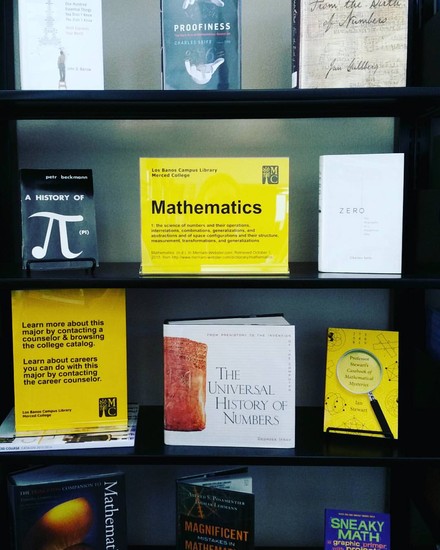
In October, I had two Major Idea displays (see the August 2015 Library Displays post to learn more about what this is), one about math and another about English, which focused on fairy tales as a theme to explore literature studies.

English

Mathematics

October 15th was also the end of Hispanic Heritage Month. See the September 2015 Library Displays post about it here..

I also put together a quick display for Breast Cancer Awareness Month, which included directions for conducting a breast self-exam in both English and Spanish. I snagged up the instructions during an event our campus had last year that had booths from the community, including the local health center.

Breast Cancer Awareness Month

One of our part-time evening librarians put together our Halloween display this year, for which I am very grateful. Here’s the online flyer I made for her display. Since I have more people to rely on in the library and now know what can be delegated, it’s been fun to see others’ creativity.

Halloween

October is always the beginning of research paper season around here, so it’s been busy! I’ll have to share more about that soon.

Introduction to Teaching Online

I’ve been a little quiet on here. At the end of September I started a month-long online class through @One, Introduction to Teaching Online. The course is being offered through the college I work for and is supported by a grant from the Chancellor’s Office, California Community Colleges.

While I don’t teach the three-unit library research course, the main campus offers two sections, although neither are taught online. For the way my load is (the only librarian during the day), it would work better for me to teach it online, but it would need to get approval through curriculum, etc. I am just starting my third academic year, and it’s only now that I feel like I am ready to add a credit course to my load.

I am also using the class to see what our online instructors needs are regarding library or related services (I did my entire Masters program online, so I already had ideas) and to remind the other faculty members taking the class with me (all the people in the class teach for Merced College) that librarians are faculty. I have been able to market LibGuides and the Library’s soon-to-be-realized Blackboard presence (it will still be in baby mode, but I’m hoping we can work with our faculty lead to make it a bit more robust). One of the math teachers has been very encouraging as I figure out how to approach teaching an entire course since I have only ever taught one-shot research sessions. The class has also has served as a good reminder about effective teaching practices. I can definitely see how taking the class would help give even face-to-face courses a lift. I honestly would love to do the entire certification program.

My class ends next week, and I’m happy because it means I can get a little more sleep. My daily commute is about 2 hours and 45 minutes round trip, and I’m also trying to hit the gym a couple of nights a week. The only thing holding me together is my husband Kory. He has days off in the middle of the week, and while he has always helped a ton, including 99.9 percent of the cooking, he seems to have kicked it up that much more. He is very supportive, and I am grateful.

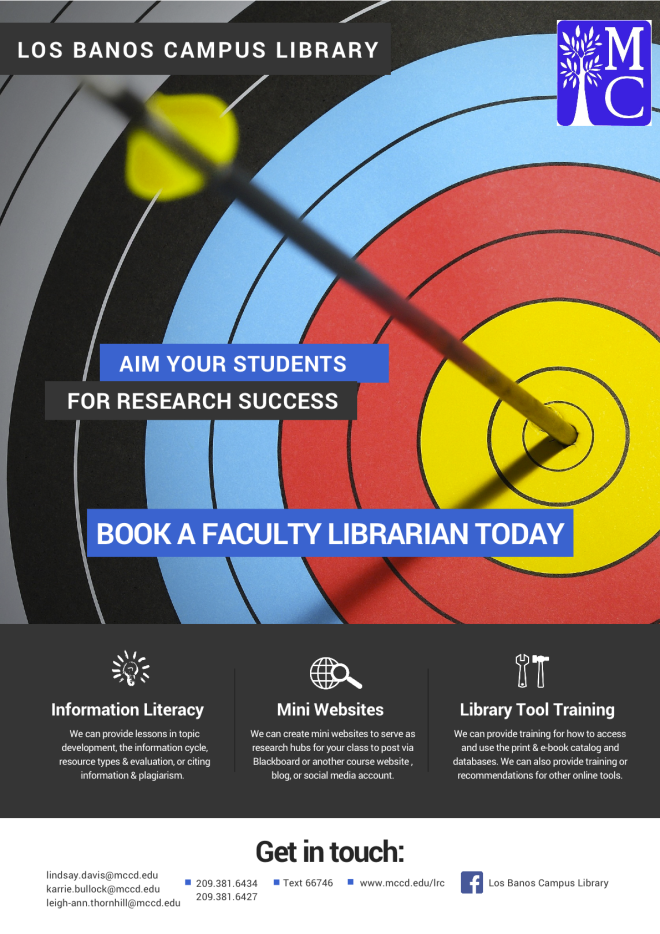
Los Banos Info Flyer (for Faculty)

Just the Highlights

Veronica Arellano Douglas's avatarLibrarian Design Share

Library informational handouts and brochures–the kind we give away at orientations, fairs, and workshops–can easily suffer from the classic librarian pitfall: TOO MUCH INFORMATION. Striking the right balance between needed information and visual interest is a challenge. Lindsay Davis, librarian at the Los Banos Campus Library at Merced College has created informational flyers for students and faculty that touch on all the library “highlights,” those crucial services and bits of information that will make the most impact with library users.

Los Banos Info Flyer (for Students) Flyer for Students

Here’s Lindsay discussing her design:

This is the beginning of my third academic year as the Los Banos Campus Librarian of Merced College, a community college located in California’s Central Valley. When I give an instructional session, I usually give out a handout that covers basic library information printed in black and white on muted yellow card stock (we only have a few color options through duplication…

View original post 283 more words

LexisNexis Academic Webinars

This year, I am making good on my goal to actually watch webinars when they happen and/or watching the archived recording during the same week (or at least month!) I receive access to it. I have a few saved from last fall and spring semesters that I need to watch.

I participated in LexisNexis webinars at the end of August, and while I do use LexisNexis at the community college and at the university, I don’t use it a whole lot. Here are my notes for each of the webinars.

LexisNexis Academic News

  • LexisNexis Academic News has 17,000 sources.
  • LN also has broadcast transcripts and transcripts from news shows, like 60 Minutes.
  • LN also has speeches, both the transcripts as prepared, as well as transcripts as delivered (the online trainer said that President Bill Clinton was famous for straying from the prepared speech).
  • LN also has a feature that opens web news from 300 web sources.
  • Coverage varies by the source and updates also vary by source. For example, full-text NYT articles date back to 1980 and content is updated daily). The lesson here is to use the information button next to the source name for the details.
  • A note about full-text: While the articles available in the database are full-text, not all articles from a particular source may be included in the database. I knew this, but I didn’t exactly know why. One reason is that freelance articles are owned by the journalist, not the publication, so journalists can elect to have their content removed from the databases.
  • LN will find the singular, plural, and possessive forms of words in searches.
  • LN will also find equivalents, not to be confused with synonyms. For example, if you type 1st Amendment, LN will also find First Amendment. This is a really good tip when it comes to numbers in this context. A search for GOP will also bring up all versions of Republican Party.
  • Librarians love field searching. I hadn’t fully explored all the search possibilities, so searching by length was new for me. What I love about this is that it might be helpful for lower level English courses. (This kind of searching reminds me of Dialog, and I was obsessed with it. I was in library school between 2010 and 2011, and even we used Dialog. Headline searching FTW

LexisNexis Legal Research

  • I don’t think I have learned this much from one webinar before. I don’t get too many legal reference questions, but I can tell you that it’s not my strong suit. I always used LN with some trepidation, and while the students and I could find the relevant cases, I knew that I needed to know more about the legal research side in LN to get the most out of it.
  • For legal cases, you can search by citation, party, or topic.
    • Citation: You have to use the exact Blue Book citation, including the periods. The citations are composed of three parts: the first number refers to volume, the second set of letters is an abbreviation for the book or reporter, and the third number refers to the page.
    • Party: You don’t have to enter both party names, and they don’t have to be in the right order. LN will do the search. Just be aware that when doing a party name search, LN will go through short party names, as well as the full list of parties involved, which could be numerous. For example, a search for Jones v. Clinton will also pull results for completely different cases whose short party name does not have either Jones or Clinton. I used to wonder why results like this pop up, but the online trainer said that when LN does the search, it pulls matches from the full list of parties, not just the short party name. Party search looks for matches in the full list.
    • Topic: This isn’t natural searching. This search will look in the headnotes section for matches. Think of headnotes like subject searching/breadcrumbs in the legal world. Here’s how headnotes are super nifty. They tell you all the subjects/topics covered by a particular case. For example, if you look up the headnotes for Roe v. Wade, you can find that other issues besides a woman’s right to choose were involved.
  • The reason why a million things pop up when you do a party search for Supreme Court cases—everything related to a Supreme Court case gets published. This is why you get a lot of hits looking up one case.
  • LN has a handy Landmark Cases feature, which you can find near the big “search everything related to LN” search box. There is a button to the right of the large search box that says “Search by Content Type,” where you can find the Landmark Cases feature. Cases are organized by topic. This is such a useful tool for the kinds of material two-year college students need for their coursework.
  • Also under the legal section under the “Search by Content Type” button is a way to search for federal and state cases. For most student research, the online trainer says it’s best to stick to one’s jurisdiction when searching. In the Federal and State Cases Search, head to the advanced search settings. There is an option to select the specific circuit, such as the 9th Circuit Court of Appeals, as well as state, such as California.
  • One of my favorite parts of the webinar was a question the online trainer posed, emulating a reference question that is probably common, “What are all the [insert your topic] laws in California?” The easiest way is to go to the ““Search by Content Type” button,” go to the Legal heading, and then select “State Statutes and Regulations.” Under the advanced options, check box statutory code and then the state. Yay for codified law!
  • LN does not have cases related to those at the state trial level. This is because the verdict only affects the parties involved in the case. The decision does not do anything to an entire state or the nation. For these kind of cases, especially for a local issue of interest, newspaper articles are the best bet for research.
  • LN has a legal reference section! Find the “Search by Content Type” button, go to the Legal heading, and then select “Legal Reference.” Under the advanced options, you’ll find American Jurisprudence 2d, Ballentine’s Law Dictionary, Bieber’s Dictionary of Legal Abbreviations, and the Modern Dictionary for the Legal Profession.
  • At this point in the webinar, I had to talk to a faculty member, so I missed the introduction to Sheppard’s. It’s a nifty citation tool that allows you see if a case has been overturned, reaffirmed, questioned, or cited by other cases.

Exciting News!

I have some really exciting news!

I just found out that my request for 36 Microsoft Surface Pro 3 tablets for my small library was funded, at 33 percent of the request, through Merced College’s student equity funds! $16,000! The dean of my campus, the Los Banos Campus, says the rest of the amount will be funded with other monies.

Why Microsoft Surface Pro 3? They are the district-approved tablets. Why 36? There is a really cool charging cart that fits 36 tablets.

The library at my campus doesn’t have a library instruction room like the other campus, and I often have to fit sessions around the computer labs that are scheduled for other classes. Often, I go to classrooms without any computers, so students don’t get to play with databases during library research sessions.

When the tablets aren’t in use for classes, students will be able to check them out to use in the library. We only have 17 computers available in the library for 1,800 students, and our statistics were around 18,000 computer uses for 2014-2015. This does not include statistics for the open computer lab across the hall.

The Student Equity committee for the college created a document of goals for both campuses, so part of the application for funding had to show how the proposed project helped meet those goals. I also incorporated how the project met the college’s strategic plan and institutional learning outcomes and how it fit with the goals of the Learning Resource Center’s program review and student learning outcomes. I think my request was also funded, in part, because it serves an instructional purpose. I included a lot of evidence in the document, and my dean was impressed with what I put together.

I have been on pins and needles waiting for a response from the committee. I am so pleased! If we go off of the timeline I created for the project, we will begin our tablet service in Spring 2016.

The start of my third full-time academic year has been fantastic! My three-year review process also begins this coming Tuesday, so I am feeling pretty good.

Participatory Culture & Vernacular Collections at the Library

I have a bad habit of collecting links through the save feature on Facebook. However, I seem to notice a penchant for public art. Consider this Colossal post about an artist who bought billboard and this NPR article about kids’ art taking over billboards in Times Square. I love members of communities being able to take part in their communities. Participatory culture is something I have been trying to cultivate in the community college library.

In Fall 2013, I did half of the Hyperlinked Library MOOC through San José State University, my MLIS alma mater. It allowed me to explore a little more about user experience, and it really got my excited about the possibilities for participatory culture in libraries. In one class discussion, I shared about the display space kids in the community are able to use to display collections of all kinds in the children’s department of the Stanislaus County Library (I worked as a bilingual Spanish/English library assistant in the children’s department for a couple of years). Kids ages 4 and up can sign up for either a display table or display case to show off rocks, soap, dolls, books, trains, cars, PEZ dispensers, LEGO creations, etc. The collections were very unique and customers of all ages love looking at new arrrivals. The collections stay in a locked case or table for two weeks. It truly is one of the coolest things that allow kids in our community to really feel that the library is theirs. (As it turns out, the idea of displaying everyday items is a thing. I did a little research, and these are called vernacular museums. I have to do a little more reading about them, but I did contact a professor from Pine Manor College about her work last year.)

I also think this idea would work well in even an academic library if locked displays cases are available. The University Library at my undergraduate alma mater, California State University Stanislaus, sort of has this with their Warrior Book Contest, which is essentially a topical bibliography students can submit. Winners can have some of their books put on display, and it’s always really interesting to see the winners’ lists and displays. I have a friend from college who won one year. I have tried a similar tactic to have individual students sign up to do book and online resource displays at the community college library, but it hasn’t worked out so far. We only have one student club on campus, so I am going to check with them this semester. But the idea of displaying collections doesn’t have to just be books and online resources. It could be action figures or Hello Kitty memorabilia. College can be fun.